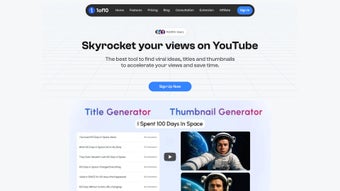

Download 1of10 – AI Video Generation Tool for YouTubers, Fast & Secure
Overview
1of10 is a subscription‑based web application built specifically for YouTubers who want to accelerate their video production workflow without sacrificing quality. Powered by cutting‑edge artificial intelligence, the platform automates time‑consuming tasks such as scene selection, voice‑over generation, background‑music syncing, and visual‑effects insertion. Whether you are a beginner looking for a guided template or a seasoned creator seeking batch‑processing capabilities, 1of10 delivers a clean, intuitive interface that turns raw footage into polished content in minutes. The service operates entirely in the cloud, meaning there is no heavy software to install, and updates are rolled out instantly, keeping you on the latest AI models and security patches. By handling the technical heavy‑lifting, 1of10 lets creators focus on storytelling, audience engagement, and channel growth, making it an essential addition to any modern YouTube workflow.
Key Features that Power Your Channel
- Automated Editing Engine: AI analyzes raw clips, removes dead space, and stitches together a coherent narrative based on your chosen style.
- Customizable Templates: Choose from over 150 pre‑designed video templates tailored for vlogs, tutorials, product reviews, and more.
- AI Voice‑Over & Dubbing: Generate natural‑sounding narration in multiple languages, or upload your own voice for a personal touch.
- Dynamic Background Music: Smart soundtrack matching that adapts tempo and mood to the visual flow of your video.
- Visual Effects Library: One‑click addition of transitions, lower‑thirds, captions, and motion graphics that are automatically synced.
- Batch Processing: Queue up multiple projects and let the AI render them overnight, saving you hours of manual editing.
- Analytics Integration: Direct export to YouTube with embedded SEO metadata, thumbnail suggestions, and performance insights.
- Secure Cloud Storage: All source files and final renders are stored in encrypted servers, complying with GDPR and CCPA standards.
- Regular AI Model Updates: New features, language packs, and visual styles are delivered automatically without extra cost.
- Collaboration Tools: Share draft videos with team members, collect feedback, and approve changes within the platform.
These features are designed to reduce the average production time from several hours to under 30 minutes per video, allowing creators to maintain a consistent publishing schedule—one of the most critical factors for YouTube algorithm success. The AI’s adaptability also means you can experiment with different styles without re‑learning complex editing software, making A/B testing of video formats more accessible than ever.
Installation, Usage & Compatibility
Getting Started in Three Simple Steps
Since 1of10 is a fully web‑based solution, there is no traditional installation process. Follow these steps to start creating immediately:
- Sign Up & Choose a Plan: Visit the official 1of10 website, create an account, and select the subscription tier that matches your upload frequency. A free 7‑day trial is available for new users.
- Upload Your Raw Footage: Drag and drop video files (MP4, MOV, AVI) into the dashboard, or connect your cloud storage (Google Drive, Dropbox) for seamless import.
- Select a Template & Customize: Pick a template, adjust AI parameters (tone, pacing, music genre), and let the engine process the video. Review the auto‑generated draft, make optional tweaks, and hit “Export to YouTube.”
Operating System Support (itemprop="operatingSystem")
- Windows 10 and later – access via any modern browser (Chrome, Edge, Firefox).
- macOS 11 (Big Sur) and later – fully compatible with Safari, Chrome, and Firefox.
- Linux distributions – supported through Chromium‑based browsers.
- Android 8.0+ – mobile‑optimized web app for on‑the‑go edits.
- iOS 13+ – responsive design works on iPhone and iPad browsers.
Because the processing happens in the cloud, hardware requirements are minimal: a stable internet connection (minimum 10 Mbps) and a modern browser that supports WebGL and WebAssembly. This approach ensures that creators on low‑spec laptops or tablets can still leverage the full power of 1of10 without performance bottlenecks.
Pros & Cons + Frequently Asked Questions
Pros
- Significant time savings – edit and render in minutes.
- AI‑driven quality that rivals professional editors.
- No software download; works on any device with a browser.
- Extensive template library tailored for YouTube niches.
- Secure, GDPR‑compliant cloud storage.
Cons
- Subscription model may be costly for occasional creators.
- Creative control limited to preset AI parameters (though manual overrides exist).
- Reliance on internet connectivity; offline editing not possible.
- Learning curve for optimizing AI settings to match unique branding.
FAQ (itemtype="https://schema.org/FAQPage")
Can I use 1of10 for non‑YouTube projects?
Yes. While the platform is optimized for YouTube’s metadata and thumbnail guidelines, you can export videos in standard formats (MP4, MOV) for use on other social media platforms or websites.
How secure is my footage stored on 1of10?
All files are encrypted at rest and in transit using AES‑256 encryption. Access is protected by two‑factor authentication and complies with GDPR and CCPA regulations.
Do I need any special hardware for AI voice‑over?
No. The AI voice‑over engine runs entirely on 1of10’s servers, so any device capable of playing audio can preview and approve the generated narration.
What happens after my subscription expires?
Your existing projects remain accessible in read‑only mode, and you can still download exported videos. To continue creating new content, simply renew or switch to a different plan.
Is there a free version of 1of10?
A 7‑day free trial is available, giving full access to all features. After the trial, a paid subscription is required to keep using the service.
Review Summary
1of10 delivers an impressive blend of AI automation and creative flexibility, making it a game‑changer for YouTubers seeking speed without compromising on production value. While the subscription cost may deter occasional creators, the time saved and the quality of output justify the investment for channel owners who post regularly.
Pros: Rapid editing, cloud‑based workflow, rich template library.
Cons: No offline mode, limited manual fine‑tuning.
Conclusion – Boost Your YouTube Production Today
If you’re serious about scaling your YouTube channel, 1of10 provides the fastest, most secure route from raw footage to a polished upload. The AI‑driven editing engine removes the repetitive grind of manual cuts, while the extensive template and effects library ensures each video feels fresh and on‑brand. With seamless cloud storage, automatic updates, and multi‑platform compatibility, the tool fits into any creator’s workflow—whether you’re working from a Windows desktop, a MacBook, or even a mobile phone.
Ready to transform your content pipeline? Start your free 7‑day trial now and experience how AI can accelerate your creative process. The sooner you adopt 1of10, the faster you’ll see higher upload frequency, improved viewer retention, and ultimately, greater channel growth.



.png)



